
Four multi-jointed yellow robotic arms pivot in unison to weld, bolt on doors, and spray-paint a moving metal car chassis along an illuminated factory track.
Watch an automated vehicle factory bring a bare metal chassis to life on a glowing assembly track. Four multi-jointed yellow robotic arms flank the conveyor line, smoothly pivoting down in unison as the vehicle rolls into each workstation.
At the first station, blue-white and orange welding sparks shower the frame while two side doors slide inward and bolt cleanly onto the body. At the second station, red paint mist swirls around the vehicle as its bare iron shell transforms into a finished red car before rolling off the line.
/scoreboard objectives add c9_t dummy/scoreboard players set #c9 c9_t -1/fill ~-14 ~-1 ~-6 ~14 ~-1 ~6 yellow_concrete/fill ~-14 ~-1 ~-5 ~14 ~-1 ~5 polished_deepslate/fill ~-13 ~-1 ~-2 ~13 ~-1 ~2 sea_lantern/fill ~-13 ~-1 ~-1 ~13 ~-1 ~1 iron_block/summon block_display ~-4 ~ ~-3.5 {Tags:["c9_st","c9_arm"],Passengers:[{id:"block_display",Tags:["c9_arm"],block_state:{Name:"gray_concrete"},transformation:[1.1f,0f,0f,-.55f,0f,.8f,0f,0f,0f,0f,1.1f,-.55f,0f,0f,0f,1f]},{id:"block_display",Tags:["c9_arm"],block_state:{Name:"black_concrete"},transformation:[.7f,0f,0f,-.35f,0f,.45f,0f,.65f,0f,0f,.7f,-.35f,0f,0f,0f,1f]},{id:"block_display",Tags:["c9_arm","c9_la"],interpolation_duration:8,block_state:{Name:"yellow_concrete"},transformation:{left_rotation:[-.174f,0f,0f,.985f],right_rotation:[0f,0f,0f,1f],translation:[-.22f,.85f,-.22f],scale:[.45f,2.3f,.45f]}},{id:"block_display",Tags:["c9_arm","c9_ua"],interpolation_duration:8,block_state:{Name:"yellow_concrete"},transformation:{left_rotation:[.737f,0f,0f,.676f],right_rotation:[0f,0f,0f,1f],translation:[-.17f,3.01f,-1.01f],scale:[.35f,2.2f,.35f]}}]}/summon block_display ~-4 ~ ~3.5 {Tags:["c9_arm"],Passengers:[{id:"block_display",Tags:["c9_arm"],block_state:{Name:"gray_concrete"},transformation:[1.1f,0f,0f,-.55f,0f,.8f,0f,0f,0f,0f,1.1f,-.55f,0f,0f,0f,1f]},{id:"block_display",Tags:["c9_arm"],block_state:{Name:"black_concrete"},transformation:[.7f,0f,0f,-.35f,0f,.45f,0f,.65f,0f,0f,.7f,-.35f,0f,0f,0f,1f]},{id:"block_display",Tags:["c9_arm","c9_la"],Rotation:[180f,0f],interpolation_duration:8,block_state:{Name:"yellow_concrete"},transformation:{left_rotation:[-.174f,0f,0f,.985f],right_rotation:[0f,0f,0f,1f],translation:[-.22f,.85f,-.22f],scale:[.45f,2.3f,.45f]}},{id:"block_display",Tags:["c9_arm","c9_ua"],Rotation:[180f,0f],interpolation_duration:8,block_state:{Name:"yellow_concrete"},transformation:{left_rotation:[.737f,0f,0f,.676f],right_rotation:[0f,0f,0f,1f],translation:[-.17f,3.01f,-1.01f],scale:[.35f,2.2f,.35f]}}]}/summon block_display ~4 ~ ~-3.5 {Tags:["c9_st","c9_arm"],Passengers:[{id:"block_display",Tags:["c9_arm"],block_state:{Name:"gray_concrete"},transformation:[1.1f,0f,0f,-.55f,0f,.8f,0f,0f,0f,0f,1.1f,-.55f,0f,0f,0f,1f]},{id:"block_display",Tags:["c9_arm"],block_state:{Name:"black_concrete"},transformation:[.7f,0f,0f,-.35f,0f,.45f,0f,.65f,0f,0f,.7f,-.35f,0f,0f,0f,1f]},{id:"block_display",Tags:["c9_arm","c9_la"],interpolation_duration:8,block_state:{Name:"yellow_concrete"},transformation:{left_rotation:[-.174f,0f,0f,.985f],right_rotation:[0f,0f,0f,1f],translation:[-.22f,.85f,-.22f],scale:[.45f,2.3f,.45f]}},{id:"block_display",Tags:["c9_arm","c9_ua"],interpolation_duration:8,block_state:{Name:"yellow_concrete"},transformation:{left_rotation:[.737f,0f,0f,.676f],right_rotation:[0f,0f,0f,1f],translation:[-.17f,3.01f,-1.01f],scale:[.35f,2.2f,.35f]}}]}/summon block_display ~4 ~ ~3.5 {Tags:["c9_arm"],Passengers:[{id:"block_display",Tags:["c9_arm"],block_state:{Name:"gray_concrete"},transformation:[1.1f,0f,0f,-.55f,0f,.8f,0f,0f,0f,0f,1.1f,-.55f,0f,0f,0f,1f]},{id:"block_display",Tags:["c9_arm"],block_state:{Name:"black_concrete"},transformation:[.7f,0f,0f,-.35f,0f,.45f,0f,.65f,0f,0f,.7f,-.35f,0f,0f,0f,1f]},{id:"block_display",Tags:["c9_arm","c9_la"],Rotation:[180f,0f],interpolation_duration:8,block_state:{Name:"yellow_concrete"},transformation:{left_rotation:[-.174f,0f,0f,.985f],right_rotation:[0f,0f,0f,1f],translation:[-.22f,.85f,-.22f],scale:[.45f,2.3f,.45f]}},{id:"block_display",Tags:["c9_arm","c9_ua"],Rotation:[180f,0f],interpolation_duration:8,block_state:{Name:"yellow_concrete"},transformation:{left_rotation:[.737f,0f,0f,.676f],right_rotation:[0f,0f,0f,1f],translation:[-.17f,3.01f,-1.01f],scale:[.35f,2.2f,.35f]}}]}/scoreboard players add #c9 c9_t 1/execute if score #c9 c9_t matches 120.. run scoreboard players set #c9 c9_t 0/execute if score #c9 c9_t matches 119 run kill @e[tag=c9_x]/execute if score #c9 c9_t matches 0 run summon block_display ~-11 ~.1 ~ {Tags:["c9_c","c9_x","c9_p"],teleport_duration:2,block_state:{Name:"iron_block"},transformation:[3f,0f,0f,-1.5f,0f,.55f,0f,.25f,0f,0f,1.5f,-.75f,0f,0f,0f,1f],Passengers:[{id:"block_display",Tags:["c9_x"],block_state:{Name:"black_concrete"},transformation:[.6f,0f,0f,.7f,0f,.6f,0f,0f,0f,0f,1.8f,-.9f,0f,0f,0f,1f]},{id:"block_display",Tags:["c9_x"],block_state:{Name:"black_concrete"},transformation:[.6f,0f,0f,-1.3f,0f,.6f,0f,0f,0f,0f,1.8f,-.9f,0f,0f,0f,1f]},{id:"block_display",Tags:["c9_x"],block_state:{Name:"tinted_glass"},transformation:[1.4f,0f,0f,-.7f,0f,.55f,0f,.8f,0f,0f,1.3f,-.65f,0f,0f,0f,1f]},{id:"block_display",Tags:["c9_x","c9_p","c9_d"],block_state:{Name:"iron_block"},transformation:[1.2f,0f,0f,-.6f,0f,.5f,0f,.3f,0f,0f,.15f,-2f,0f,0f,0f,1f]},{id:"block_display",Tags:["c9_x","c9_p","c9_d"],Rotation:[180f,0f],block_state:{Name:"iron_block"},transformation:[1.2f,0f,0f,-.6f,0f,.5f,0f,.3f,0f,0f,.15f,-2f,0f,0f,0f,1f]}]}/execute if score #c9 c9_t matches 1..115 as @e[tag=c9_c] at @s run tp @s ~0.19 ~ ~/execute if score #c9 c9_t matches 32 as @e[tag=c9_d] run data merge entity @s {interpolation_duration:8,start_interpolation:0,transformation:{left_rotation:[0f,0f,0f,1f],right_rotation:[0f,0f,0f,1f],translation:[-.6f,.3f,-.88f],scale:[1.2f,.5f,.15f]}}/execute if score #c9 c9_t matches 75 as @e[tag=c9_p] run data modify entity @s block_state.Name set value "minecraft:red_concrete"/execute if score #c9 c9_t matches 22..46 run particle electric_spark ~-4 ~1.1 ~ 0.2 0.2 0.85 0.12 8/execute if score #c9 c9_t matches 22..46 run particle flame ~-4 ~1.0 ~ 0.2 0.15 0.85 0.06 5/execute if score #c9 c9_t matches 62..90 run particle dust{color:[0.95,0.1,0.1],scale:1.8} ~4 ~1.1 ~ 0.35 0.35 0.9 0.05 14/execute at @e[tag=c9_c] if entity @e[tag=c9_st,distance=..4.0] as @e[tag=c9_la] run data merge entity @s {start_interpolation:0,transformation:{left_rotation:[0.242f,0f,0f,0.970f],right_rotation:[0f,0f,0f,1f],translation:[-.22f,.85f,-.22f],scale:[.45f,2.3f,.45f]}}/execute at @e[tag=c9_c] if entity @e[tag=c9_st,distance=..4.0] as @e[tag=c9_ua] run data merge entity @s {start_interpolation:0,transformation:{left_rotation:[0.924f,0f,0f,0.383f],right_rotation:[0f,0f,0f,1f],translation:[-.17f,2.88f,.86f],scale:[.35f,2.2f,.35f]}}/execute at @e[tag=c9_c] unless entity @e[tag=c9_st,distance=..4.0] as @e[tag=c9_la] run data merge entity @s {start_interpolation:0,transformation:{left_rotation:[-.174f,0f,0f,.985f],right_rotation:[0f,0f,0f,1f],translation:[-.22f,.85f,-.22f],scale:[.45f,2.3f,.45f]}}/execute at @e[tag=c9_c] unless entity @e[tag=c9_st,distance=..4.0] as @e[tag=c9_ua] run data merge entity @s {start_interpolation:0,transformation:{left_rotation:[.737f,0f,0f,.676f],right_rotation:[0f,0f,0f,1f],translation:[-.17f,3.01f,-1.01f],scale:[.35f,2.2f,.35f]}}setup #7 Spawns one multi-part yellow robotic arm using a root <code>block_display</code> with <code>Passengers</code> for the pedestal, shoulder joint, lower arm (<code>c9_la</code>), and upper arm (<code>c9_ua</code>). Giving the south-side arms <code>Rotation:[180f,0f]</code> lets both sides share the exact same animation transforms.loop #4 At tick <code>0</code> of every 120-tick cycle, spawns the bare metal vehicle chassis at the start of the track with <code>teleport_duration:2</code> for smooth gliding and five <code>Passengers</code> for wheels, tinted windows, and hovering side doors.loop #6 At tick <code>32</code> inside the welding station, merges a new <code>translation</code> and <code>interpolation_duration:8</code> onto both <code>c9_d</code> door entities so they glide inward and bolt flush onto the chassis.loop #7 At tick <code>75</code> inside the paint booth, updates the <code>block_state.Name</code> NBT of every <code>c9_p</code> body and door panel from <code>iron_block</code> to <code>minecraft:red_concrete</code> while red dust mist swirls around the car.loop #11 Checks whether the moving chassis <code>c9_c</code> is within 4 blocks of either <code>c9_st</code> station marker and rotates all four lower arms down toward the track in unison; when the car leaves, command 13 smoothly retracts them.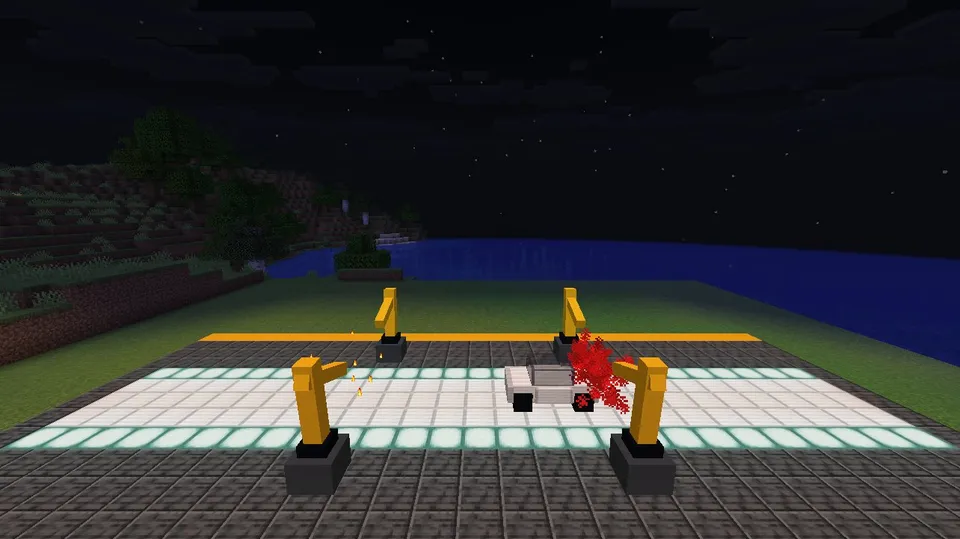
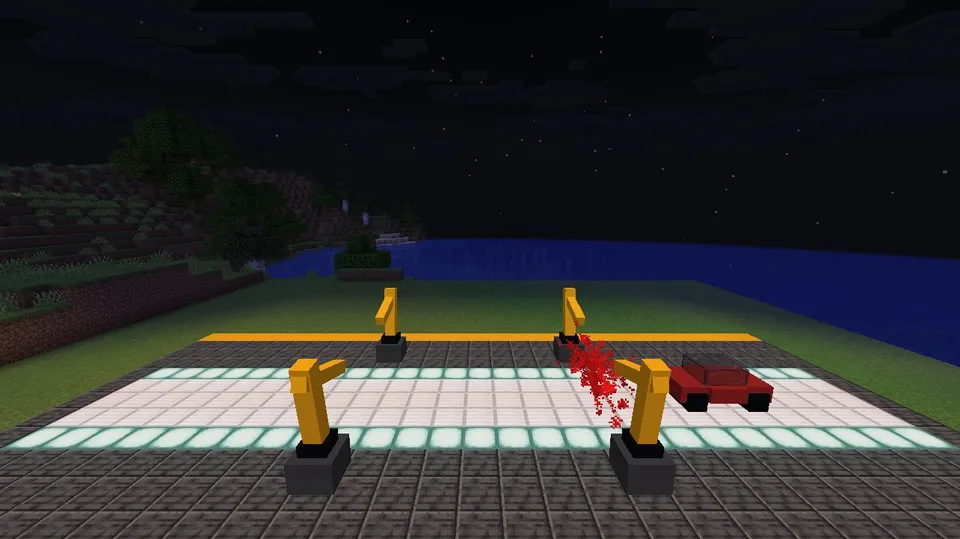
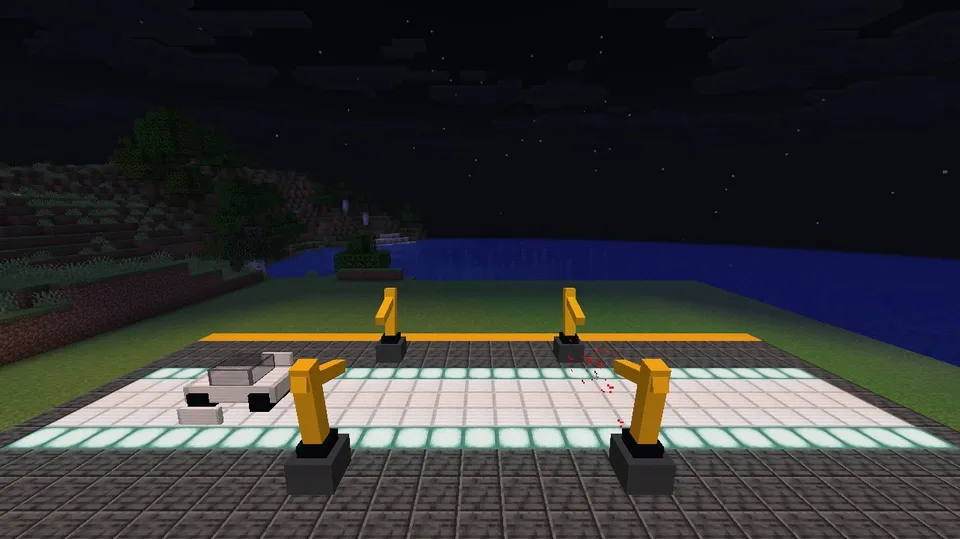
Recorded on our own test server: 50 frames at about 9.9 fps. Our image check saw: A white car chassis rolls along a glowing track flanked by four yellow robotic arms that attach its side doors with flame sparks at the first station and spray-paint it red at the second.
/kill @e[tag=c9_arm]/kill @e[tag=c9_x]/scoreboard objectives remove c9_t/fill ~-14 ~-1 ~-6 ~14 ~-1 ~6 grass_blockYes! In loop command 7, replace <code>minecraft:red_concrete</code> with any concrete block such as <code>minecraft:light_blue_concrete</code> or <code>minecraft:lime_concrete</code>, and update the RGB values inside <code>dust{color:[0.95,0.1,0.1],scale:1.8}</code> in loop command 10 to match.
Using tilde coordinates keeps the entire assembly line centered on the stage origin without hardcoding world coordinates, so you can place it at any flat location by running the commands relative to your chosen center block.
 ▶Automated Potion Bottling Conveyor LineComplex Contraptions & CinematicsEasy
 ▶Levitating Ancient Obelisk Rune AssemblyComplex Contraptions & CinematicsEasy
 ▶Medieval Trebuchet Castle Wall SiegeComplex Contraptions & CinematicsMedium
 ▶Multi-Stage Space Rocket Launch SequenceComplex Contraptions & CinematicsMedium
 ▶Rotating Brass Celestial Orrery MechanismComplex Contraptions & CinematicsEasy